Archive

Posts Tagged ‘Spreadsheets’

What is a spreadsheet-wiki?

June 3rd, 2009 4 comments

While I’m on the subject of products I really want to see, I would be remiss of me not to mention the spreadsheet-wiki. This one should already exist by now, and I hold myself largely responsible for it not — after all, I spent almost a year working with Dan Bricklin and Socialtext trying to make it happen. When we parted ways, I hoped to be able to continue the project, but for a variety of reasons that never came together either. There have, from time to time, been vaguely encouraging noises from Socialtext, but this still doesn’t seem like a high priority for them, and the information that leaks out from time to time implies they’re still going down a different path. I’ve deliberately held back from talking about some of this stuff to give them a chance to get something out, but it’s 18 months now since I left, any inside knowledge I had is long past its sell-by date, and I really want to see this come together from somewhere.

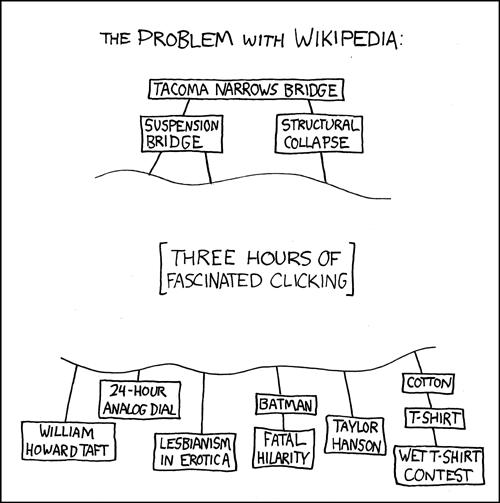
By far the most common response when I tried to explain to people what I was working on, and what a spreadsheet-wiki actually meant, was “Oh, you mean like Google Spreadsheets?” But Google, and their online spreadsheet rivals, aren’t really creating what I want. Google Spreadsheets is no more a spreadsheet wiki than Google Docs is a text wiki. Yes, they’re great for collaboration, but that’s only half the wiki story. The critical other ingredient on a wiki is the humble link. Even outside wiki-land the power of the hyperlink is still poorly understood and massively underrated. It’s the fundamental building block of the Web, but even still hasn’t lived up to anywhere near its potential. Almost everyone, when they talk or write about Wikipedia, focuses on the “Anyone Can Edit!” part (whether with awe or despair), but the vast majority of readers never edit anything—the key for them is that absolutely everything is a link:


My dream is that that could also be true for numbers.

Wikipedia, of course, is full of numbers. People can talk about them, change them, cross-reference them, and do all manner of wiki goodness with them. But that’s not enough. Those numbers currently live in splendid isolation. They can’t interact in a spreadsheety way.

There have been various attempts to fix this, generally involving embedding spreadsheets into wiki pages as a replacement for plain tables. But although that achieves the goal of being able to perform some basic calculations in-place, it’s no better than being able to embed an Excel sheet in a Word document. It doesn’t solve any of the well known problems with large spreadsheets (aka Spreadsheet Hell). In a spreadsheet-wiki the spreadsheet should not be a second class citizen, subservient to the wiki. Rather, the spreadsheet should itself contain wikiness. Forget simple single sheet spreadsheets; I’m talking here about hundreds or thousands of properly cross-linked sheets, all mutually feeding each other. Forget having to email around your monthly financial statements comparing actuals to budgets with everything gradually drifting out of sync as no-one is quite sure which is the master copy any more, and no ability to examine how you got to what you have. In a spreadsheet-wiki every number is a link. You can see where it came from, and where it’s being used. If an assumption changes, everything that depends on it automatically changes. No more wasting 3 weeks in a dead end because you were working from old numbers. No more wondering why that P&L entry for “Miscellaneous Expenses” was so high in March. No more wasted time collating projections and forecasts from department heads, harmonising them into a divisional budget for the upcoming year, only to have to redo the entire process 4 times when the CFO trims your budget, or the COO explains some of the impact of a new office opening in in September. Instead everyone can work on their own page, have the data pulled automatically into a series of other sheets, and have changes take effect universally and instantly whilst everyone hammers out the details — with, of course, full transparency of who changed what when (and hopefully why), and the ability to roll-back to any earlier stage.

Most of the technology to make this work already exists. There are some interesting issues when you start talking about thousands of inter-related sheets, but that can evolve when we see what the real usage patterns are. Making something come together that will show just how powerful a concept this is, is mostly just a matter of vision, SMOP, and tuits. Like any of my other ideas, I’d love to work on it, but I can’t build it on my own. If you’re interested in working with me on it, or just building it yourself and picking my brains from time to time, please get in touch.

More bmi Hacking

May 26th, 2009 3 comments

Star Alliance claim to be ‘committed to delivering to you the latest flight schedules from the Star Alliance members on multiple platforms Anytime, Anywhere.”‘ (emphasis mine). What’s more they go on to explain that that means that it will be ‘Automatically updated on your platform of choice.’

That is unless your ‘platform of choice’ is anything other than a Windows PC or a handheld with Palm OS, as their Electronic Timetable doesn’t run on, for example, a Mac. Instead we need to just make do with a hulking big PDF.

So, I decided to parse all the data out of that PDF, and on the basis that others might find it useful, make it available as a CSV file: Star Alliance Timetable 2009-05.

It’s nothing fancy, but being able to open it in Excel and filter on the various columns is still quite useful, and of course it opens up any number of other possibilities. I’m also considering building a little mini-application that makes it easier to play with, so if anyone has any suggestions for that, I’m all ears.

Open as in Opendom

February 9th, 2008 No comments

Working, as I am, on a spreadsheet application, I often refer to the Open Formula specification which does a fairly good job of providing useful edge-case tests, and noting inconsistencies between the implementation of various functions across Excel, Gnumeric, Open Office, etc.

Recently I noticed that one of their test cases seemed to have a spurious minus sign in it. After confirming that I was correct in every spreadsheet app I had access to, I decided to be nice and report this to them.

But:

  • There is no email address prominent in the document to send it to
  • There is, however, a link in the PDF that takes you to a website that has a well-hidden link (that looks like text, but, for no obvious reason, isn’t, so that using Find in your browser doesn’t actually find it) to a feedback form.
  • When you eventually find and follow the link, you are told: due to technical problems the public “Send a Comment” button on the formula subcommittee page currently DOES NOT WORK. We very much want to receive public comments — for now, please send comments to the formula subcommittee through the <OpenDocument TC comment form>.
  • Upon following that link, you discover that the mention of such a comment form was a lie, and you actually need to subscribe to a mailing  list.
  • But before you can even think of subscribing, first you need to download a PDF of a legal agreement (or, more accurately, a blank template of a legal agreement that isn’t even filled in for the right specification yet).
  • Then you need to read and understand the 6000 word OASIS Intellectual Property Rights (“IPR”) Policy.
  • Then, even if you were minded to sign such a document without first taking legal advice, you need to work out what to do with it. The “Guidelines for Mailing List” page implies that there’s a “Subscription Manager” tool that would presumably require you to submit the filled in legal document somehow, but that link is actually just a local link to <a href=”#subscribing”>, which simply takes you back up the page by two lines, as that’s the section that the link is already in.

Maybe there are more instructions in an auto-response email when you try to subscribe, but I don’t know, because I never got that far. Instead I emailed the committee chair – only to get a response (a real one, from a live person, not an auto-response) saying that paying any attention to my email without me going through the entire process would “potentially contaminate the work of the TC”.

Unsurprisingly I haven’t reported any of the 20+ errors I’ve found since.

Tags:

What I’m doing on my Summer Holidays

December 21st, 2007 No comments

At the end of November I parted company with Socialtext. I achieved more in my first two weeks there than the subsequent 8 months, and I never managed to find the arguments that would convince the company to fund the project properly. With a new CEO and VPE in place, Socialtext is moving in a new direction, and I’ve decided (with their agreement) to pursue by myself what I was unable to make happen there.

It’s going to take a while for all the pieces to fall into place, not least because I’m using the opportunity to take February and March off to do a Grand Tour of Australia, but I’ve already begun the first phase:

This is a forked version of the core calculation engine from SocialCalc 1.1.0. There is no UI, no file storage, nor any of the peripheral features that would be required for a full-blown spreadsheet application. But it does provide (pace a few small problems) all the functionality for performing spreadsheet calculations at the first level of the OpenFormula specification (approx. 110 functions). It’s unclear what’s going to be happening with the “open development” model of SocialCalc itself now that neither Casey nor I are working on it, but even if that continues with someone else at the helm a fork is almost certainly required due to conflicting requirements.

One of the significant restrictions that Dan imposed on the project was that idiomatic Perl code was problematic, as he wanted it to be easily translatable into other languages. This made it particularly difficult to refactor the code in the directions that I believe it needs to move to support the next phase of the project. Now, free from those constraints, I can tear the code apart and put it back together again in the ways that I please. And as I don’t have to support a UI or a particular storage format, this gives me even more freedom to make the engine much more flexible without worrying about backwards compatibility. This is particularly important as I don’t have the safety net of a test suite. We did have the beginnings of a test suite in the public SVN repository, but as that was never officially released, the licensing of it comes with somewhat of a question mark. So I’ve started from 0% coverage again, and begun to implement all the test cases provided in the OpenFormula spec. This has uncovered some interesting bugs (some of which were no doubt caused by the manner in which I extracted the engine from the already splintered SocialCalc code, but many of which I’ve confirmed are also present in SocialCalc), but rather than get bogged down in fixing those, I’m concentrating first on building sufficient coverage, then splitting out all the functions, and then fixing the bugs. That should take me to the end of January, at which point I depart Dunedin for Kiwi Foo and a week of touring the north island, before my 8 week journey around Australia.

Feel free to play with it in the meantime, but if you have any queries or hit any problems, don’t expect a response until April!

Tags:

Socialcalc update

June 22nd, 2007 1 comment

A lot of people have been asking me recently what I’ve been up to for the past few
months, and when they’re going to get to see all the interesting stuff we’ve been up to with SocialCalc. Hopefully I’ll finally have something to point to in the next couple of days, but I’m embarrassed to say that it’s not going to be particularly interesting to many people yet, because the bulk of my time recently hasn’t been spent on making the product better, per se, but fighting over its licensing. In fact there’s been so much internal argument about license issues that there have even been calls from some staff to extend the RSS functionality of the wiki to be able to just block any update that contains the word ‘license’!

Several people have asked me what the big deal is, and whether we’re not just expending a lot of energy arguing over semantics. But yesterday’s post by Michael Tiemann, president of the Open Source Institute (OSI), spells out in more detail what’s at stake as the definition of “Open Source” gets eroded further and further. Although Socialtext aren’t mentioned by name in it, I think they may well be the “vendor [who] has pursued both lines of attack”. The official company position, as spelled out recently by Ross, our CEO, is that “we will refer to our products as open source as the STPL is consistent with OSD“.

This has caused significant problems for me (and indeed the entire SocialCalc team, but I don’t want to speak for them here, and they’ll have to tell their own stories) as I personally think the STPL is a terrible license, and certainly not in keeping with the spirit of Free Software or Open Source. I believe Socialtext does want to do the right thing, and I’m going to help with the process of trying to create a better license, but we couldn’t keep on waiting for that to happen to actually make progress with SocialCalc.

So, after a lot of great work by Dan, Casey, and Liz we finally managed to find a way forward. We’re still going to release SocialCalc 1.1 under the STPL until we have a better license. I don’t know that the official company line will be, but no-one on the team is going to claim that it’s truly Open Source. [Update: Ross isn't sure either]

However, we’ve also got agreement that the underlying core spreadsheet functionality can be released under the (newly approved) Artistic License 2.0, which is accepted as Free/Open by both the OSI and FSF, and is compatible with pretty much every other FLOSS license around. This includes the entire calculation engine, as well as the parts responsible for displaying and editing sheets. This isn’t quite enough to be a full application in its own right, and doesn’t include any of the publishing functionality, or the site/host/user management, but it is enough for people to embed working spreadsheets into other applications that already take care of all that. The Artistic License allows us to be as wildly promiscuous, integrating not only with GPL applications, but also ones that wouldn’t be compatible if we had gone for GPL (e.g. MPL). And we’re keen to work with people who want to do just that. The initial split between AL and STPL is a little clumsy, and it’ll take us a while to tidy everything up. We don’t even have a separate download yet for the ‘core’ that someone could easily work with. And there’s certainly no documentation of it all. But we can tidy that all up as we move forward, and we’re not going to hold up the release any longer.

We’re just waiting for the final go-ahead and then we’ll flick the switch to release. Ross has been hugely supportive of this approach (and even thanked us for having refused to take “no” for an answer) and many thanks are due to him for that. I’m not sure we can change his entire philosophy just yet, but hopefully we can use this to show that doing proper Open Development of truly Free Software can work in a business setting. And hopefully I can now get on with helping turn SocialCalc into something great.

Feel free to follow our progress on the mailing list or blog if you’re interested in how we get on or (even better) want to play along.

Tags:

F23 v $F$23

April 5th, 2007 2 comments

Eugene Kim raises some interesting questions about the addressibility of content from on-line spreadsheets in a blog post: “Spreadsheets 2.0 and Transclusions

Some of this is similar to issues Danny Ayers raised about “WikiCalc and the Semantic Web” a year ago.

Both, however, fall into a trap that is a common source of spreadsheet woe: the difference between $F$23 and F23.

Using $F$23 says: any time you want to look up my value, get me whatever is in column 6, row 23.

Using F23, on the other hand, says: get me the data that is currently in column 6, row 23, but it’s the data that’s important, not the cell, so if that data moves, then adjust accordingly.

You see, the contents in a spreadsheet are fairly fluid. Rows and columns get inserted or deleted. Values get moved about – either just for aesthetic reasons, or because sorts the data. Behind the scenes the spreadsheet engine goes to a lot of work to make sure that when things change every reference is adjusted so point to the new location of the data they want.

But, of course, in the case of a remote web page somewhere pointing at http://spreadsheets.com/fred/sales_data_2006_Q4/K23, the spreadsheet engine has no ability at all to tell that page that what used to be in K23 has suddenly moved to L16.

Although it’s rare that what we *really* want is $K$23, that’s all the constructing a URL in this way can give us. Now, of course we could come up with workaround to this, from the low-tech approach of just declaring when a sheet is ‘final’ and won’t change, and so is suitable for such referencing, through to a complex event publishing model where if you’re going to refer to a sheet’s contents you also need to subscribe to its feed of changes so that you can adjust your URLs accordingly.

But neither of these things should be necessary. Spreadsheets already have the concept that is needed here: named ranges. Rather than addressing a cell, or group of cells, by their loation, and needing to adjust when that location cells, almost all modern spreadsheets allow you to give a (possibly) meaningful name to the data instead: “sales_tax_rate”, “Q3 estimates”, “xyzzy”, whatever.

So instead of making cell “C4 = B4 * M21″, you can say that “C4 =B4 * vat_rate”. And if M21 happens to move, well, we don’t care and don’t need to change anything. In a traditional spreadsheet this makes it much easier to follow what’s going on when constructing complex worksheets, but on-line it has a huge additional bonus: the added level of indirection makes it the responsibility of the spreadsheet to keep track of where the important data is, rather than the referrer.

And with a URL more akin to: http://spreadsheets.com/fred/sales_data_2006_Q4/west_coast_total, we’re protected from any rearrangement of data.

This still leaves a couple of different problems. Firstly, named ranges doesn’t exactly have a lot of support amongst the main online spreadsheet tools at this point. Presumably this will change soon, as serious spreadsheet users rely heavily on them.

More interestingly, it still leaves a gap where the spreadsheet author hasn’t given a name to the data you actually want access to. Unlike the PurpleNumbers approach, it’s difficult to even automatically give non-meaningful names to everything, as the number of possible ranges in a sheet gets very big very fast (not just A1, A2, B1, B2 etc, but also A1:A2, A1:B1, A1:B2, etc, and even dynamic ranges). It would be like having to give PurpleNumbers to every combination of letters in a document: not just each paragraph.

But even if people were to start naming the ‘important’ data in their sheets, and that data was then addressible with a normal URI, we get a huge amount of value. On that front both Eugene and Danny are completely correct. Although this naming issue distracts from their central issue, it certaily shouldn’t be seen to detract from it. We’re entering a world of addressible data: let’s just make sure we get it right.

Tags:

My work here is done

February 14th, 2007 3 comments

When we took over Ireland’s oldest ISP, almost 3 years ago, we hoped that we would be able to turn it around in 6-12 months. Unfortunately it was in much worse shape than we had been led to believe, and it took a lot longer than planned.

After several tumultuous years, the beast has been tamed, and, barring unforseen trouble in the next couple of months, we’re about to post our second consecutive year of clear profits – an unparalleled feat in over 10 years of trading.

And with that I believe I have successfully made myself redundant, and can move on.

As longtime readers will know I have been using wikis for a long time, and most recently have been abusing the Semantic MediaWiki extension to layer a financial reporting tool on top of a wiki. As part of the discussion surrounding this Ross Mayfield of Socialtext had pointed me at Dan Bricklin’s wikiCalc, the project by the inventor of the original computer spreadsheet to merge that concept with a wiki.

Although I don’t believe that that would be able to do what I need yet to build a full financial system, or indeed to do much beyond creating simple web tables, the idea intrigues me greatly, and after a variety of discussions over the last month or so, I’ve decided to join forces with Dan and Socialtext to see what I can do to help it get there.

I’m really excited about moving back into startup land again, and working with some really great people who are actively engaged in trying to change the world.

And hopefully I don’t fall into the trap, seemingly all too common in this line of work, of being too busy actually creating “social software” to post here anymore…

Using a Wiki as an Accounting System

September 21st, 2006 11 comments

In the UK, the de facto accounting system for small business is SAGE. This is most unfortunate, as it is an appalling piece of software for many, many reasons. I can rant for hours on its many shortcomings, but today I’ll mention two of the biggest ones, and how we’ve been able to work around these using a wiki.

Firstly, its reporting is terrible. It can, of course, give you all the traditional accounting reports – P&L, balance sheet, cash flow, actual vs forecast, debtors list, creditors list, etc. etc.. In recent years they’ve even added the ability to produce these in HTML. However, there is no way to interrogate the output or investigate things further. When I see a financial report I want to be able to click on any piece of data on it to get further information. This is a classic case of a 90% solution. There are really complex tools available to let you slice and dice data any way you want, but in a small business, just making each number a link to a screen that shows you what makes up that total is generally both necessary and sufficient. SAGE fails miserably here. I’ve encountered many companies who went used to go through the process of getting their bookkeeper or accountant to print these reports on a regular basis, but never really understood what they were seeing, so eventually reverted to the traditional “gut feel” approach that most small business owners prefer, leaving formal reporting for their annual accounts and their semi-regular reports to the bank manager.

SAGE does allow you custom build your own reports, but as far as I’m aware there’s no facility to allow for the creation of “interactive” reports. It’s also highly likely that some enterprising company has built some sort of add-on to do this, as there’s an entire third-party ecosystem surrounding SAGE, but I’ve never found one.

This reporting problem falls into the “generally annoying, but I guess I can live with it category”. Historically my general approach has been to export the pertinent information as CSV and manipulate in Excel – what most companies seem to do when they get big enough to move up from having a simple bookkeeper to actually hiring an accountant.

The much bigger problem however — the one that makes me tear my hair out when having to work with SAGE — is how it deals with accruals. This is an accounting concept whereby you are aware of income or expenses that will apply to an given accounting period, but for which an invoice has not yet been raised. The classic example is a bill that is issued quarterly in arrears. A quarterly bill for £60 should really be entered as £20 for each of the three months. But when you go to close April’s accounts, that quarter’s bill hasn’t arrived yet, so obviously hasn’t been entered on the system. As such your accounts don’t accurately reflect the costs incurred in the month. So you have to accrue a £20 charge that can be reconciled when the bill finally arrives. Similarly, if the bill is quarterly in advance, you don’t want to just charge the full bill against the month when it arrives, so you assign parts of it to each of the next two months. SAGE makes this remarkably complicated. Bookkeepers and accountants have gotten so used to that they don’t really think about it, but watching the confusion of a new admin assistant learning how to do it drives me insane. As a result, many small businesses just don’t bother doing this and their monthly accounts swing wildly in the months where the bigger invoices hit.

One of my standard rants to accountants is about how, yes, double entry bookkeeping was a great invention in 12th Century, but it’s no longer a useful metaphor for users of a computerised accounting system that should be able to take care of such things by itself. Business owners and managers want to enter sales and purchases, note when these are paid, and then check it all off against the bank statements each month to make sure nothing untoward has happened. They don’t care, and shouldn’t need to care, about journals and ledgers and trial balances.

But there seems to be no such thing as “modern” accounting software. They’re all just computerised versions of an ancient system. Some manage to hide more of the underlying mechanisms more than others, but it doesn’t take much scratching to discover what’s really under the surface.

When we took over the running of Ireland’s oldest ISP a few years back, the accounts were a mess. Customers were billed monthly, quarterly, six monthly, and/or annually – some in advance, some in arrears, some in the middle of their billing cycle. How they were billed also bore little relation to how they actually paid – many of the customers who got annual bills actually paid monthly, for example. Suppliers, in turn, tended to invoice quarterly in advance. Large software development projects also carried a substantial Work in Progress element. It was a huge amount of work at each month end to enter all the necessary accruals and movements, and the resulting P&L and balance sheet were mostly incomprehensible due to the wild swings involved in booking or releasing money from customer pre-payments, often received months earlier, but which have to be treated as a liability until that month’s services have been delivered.

The simple solution to this problem is of course to just allow each invoice (whether sales or purchase) to have an associated ‘period’. A phone bill charges for the previous quarter’s calls, and the following quarter’s line rental. Most companies account for these separately so already split the bill and assign each a different nominal code. The trick is to also add the relevant dates to each: calls from April 06 – June 06, line rental from July 06 – September 06. The software can then do all the calculations it needs for accruals each month without the need for a hideously complex manual month-end process. SAGE, however, doesn’t allow you to do this. They’re not alone. Every accountant I’ve spoken to is completely unaware of any low-end financial software that does. But they all agree that it would make the accounting process much, much simpler for most companies. I can’t believe that no-one else has ever thought of doing this, so I’m left with the assumption that it’s just a giant conspiracy to create unnecessary jobs for millions of accountants and bookkeepers.

So, in frustration, we decided to use a wiki for our accounts instead. Mediawiki with the Semantic extensions makes for a very interesting data store, as I’ve written about previously. For basic accounting information there are only really a few key concepts: purchase invoice, sales invoice, payment made, payment received, bank lodgement, bank statement.

Each gets its own Category, and has a set of relationships and attributes defined. Each invoice has attributes for net, VAT, and gross amounts, a nominal code, an issue date, and a from date/to date pair for the period it applies to. Each also has a Supplier/Customer relationship which of course links to the page on the wiki where we’re already storing information for that company. A cheque received relates to one or more invoices, has attributes for the amount, and is related to a Bank Lodgement, which in turn is an amount on a date to a bank etc. A provisional bank statement can then be generated through an <ask%gt; query for each transaction applying to that bank in a given period. This can then be visually cross-referenced against the physical statement when it arrives to make sure that nothing is missing or erroneous. Most small companies are on cash accounting for VAT, so the bank statement query can also be set to also include the VAT portion for each transaction, and a simple sum provides all the information necessary for the quarterly VAT return.

Producing a P&L is trickier. The syntax isn’t really expressive enough to do this yet, and I’m not sure it ever will be. Even if it allowed the full Sparql syntax, as has been mooted, I suspect the computations to properly assign invoices over various accounting periods might be too complex. At the minute we produce these by querying the wiki’s underlying database directly with a Perl script that does all these calculations. This also means, of course, that each piece of data on the resulting report can be a link to a page explaining how it’s made up.

The process is, of course, error-prone. But it’s much, much easier to correct errors in a wiki than in SAGE. Mediawiki, of course, maintains a full revision history for every page, so there’s a built in audit trail that’s much easier to examine than the one in most financial systems. We’ve created a few scripts that run regularly to look for obvious errors, such as invoice items where the net + vat doesn’t equal the gross. The syntax is still too simplistic for some of the reporting we’d like, so until it provides aggregate functions, or until we learn how to use RDF better, we still have to do too much digging at the raw data with SQL. It’s very far from a complete financial system, as we haven’t really needed to deal with things like share capital (although asset purchases are simply a purchase invoice with a very long from date/to date range, so the bulk of a balance sheet is there). And it’s built on a fast changing base – Semantic Mediawiki is still in the early stages of development. So it’s certainly not something everyone could, or even should, do. But it has allowed us to remove a huge amount of recurrent admin work, see much more clearly what the financial status of the company is in real time, and drill down into that data where something seems puzzling.

All we need to do now is edit the ten years worth of historic data that we imported to assign the correct periods to each invoice…

Last Day of Month in Excel

December 15th, 2004 24 comments

My next Excel Top Tip is how to calculate the last day of a month. I thought there was a function to do this as part of a whole suite of date manipulation functions, but I seem to have imagined that, as I can’t find it now. I was dreading having to do lots of nasty date arithmetic, but then I discovered that the zeroth day of a month is treated as the last day of the previous month! So the last day of the month for the date that’s in cell B3 is simply:

=DATE(YEAR(B3), MONTH(B3)+1, 0)

It even works across year boundaries, so DATE(2004, 13, 0) really does give December 31st 2004!

Fun with Excel

December 7th, 2004 1 comment

I’m trying to build a simple bookkeeping system in Excel, and I’m learning all manner of interesting things. But I ran into a significant problem that I’ve found a really ugly solution to. If this is really the best way to do this, hopefully this post will be useful to someone else someday. If it’s not, then hopefully someone will let me know what is so I can rid this bad taste from my mouth!

The (oversimplifed) issue is this: consider 3 worksheets: one for purchases, one for sales, and one for the bank statement.

The purchase invoices go into the Purchase sheet as they arrive, and similarly the sales invoices to the Sales sheet as they’re raised. Then, when they are paid, or the money is received, an entry is made in the Bank sheet. To tie them together, the bank sheet has an “Xref” column in which you enter a pointer to the reference number of the relevant Sale or Purchase cell. So it becomes, for example, “=Sale!A6″. This was all fine, until I then wanted the next column to auto-fill the amount of that invoice so we can check the amount is correct on both sides.

Sounds simple, but I can’t find any way to do it with normal Excel functions. Every function I can find works on the value of a cell, not the underlying reference. So when I access “Bank!B10″ it will give me “SI0103″ rather than the “Sale!A6″ I need to do my dynamic lookup. I asked a few users and they all said “Oh that sounds like it should be doable”, but no-one could actually come up with a way to do it.

Eventually I had to write (for values of write that involve cut’n'paste from a useful website somewhere) a VB function into the spreadsheet to get the formula for a Cell (with all the security warning implications that brings):

Function udfFormula(cell As Range) As String
Application.Volatile
If cell.HasFormula = True Then
udfFormula = cell.Formula
End If
End Function

With that I could slowly build up the formula I needed: C10 becomes: “=udfFormula($B10)”, and D10 becomes “=REPLACE(REPLACE($C10,FIND(“!”,$C10)+1,300,”1:65536″),1,1,”")” to translate the “=Sale!A6″ into “Sale!1:65536″. Then I can plug that into E10: “=VLOOKUP($B10, INDIRECT($D10), 4, 0)” to lookup the referenced ID on the sheet and get back the value in the 4th column over, which is the amount. Phew!

I tried putting this all in one formula, but Excel started running really slowly, failing to calculate the formulas, and even getting them wrong, so I kept it in several columns which I can hide once I find a way to have the formulas auto-fill into the cells.

I still don’t believe this is the correct way to solve this, though…

Tags: